Showing posts with label i pad mini. Show all posts

Sunday, April 28, 2013

2 Ways to Fix the Typing-on-Touchscreens Problem

Typing-on-touchscreens

Considering how much typing on a glass touchscreen blows in comparison to using hard keys, it's easy to imagine how Blackberry saw the first iPhone back in 2007 and thought, "Bah, this isn't a threat." We all know how that turned out. But typing on glass still blows, and voice dictation on mobile devices (while pretty awesome) isn't a good fit for every situation. So how can we un-blowify touchscreen typing? Two interesting software-design approaches have recently emerged: one rethinks how the keyboard looks, while the other rethinks how the keyboard acts. (Spoiler alert: I think the latter has more potential.)
KALQ, an experimental system developed by a team of HCI researchers including Per Ola Kristensson (whose distraction-reducing display interface I wrote about here), takes the standard QWERTY keyboard layout and redesigns its layout to reflect mobile-device usage patterns (well, one in particular: gripping a phablet or tablet in landscape view with both hands and typing with one's thumbs). KALQ takes its name from its redistribution of the QWERTY keys. It splits the keyboard into two mini-keyboards: one on the left, one on the right, each positioned within easy striking distance of the thumb on each hand, with the letters laid out in such a way to maximize efficiency. For example, the researchers discovered that oft-typed words like "on," "see," "you," and "read" must be typed solely with one thumb if the QWERTY keyboard is simply split in half. Typing entire words (even short ones) with one thumb is slow and awkward. So they redistributed the keys across the two "boards" to make a better ergonomic fit for these word-usage frequencies.
The result? A 34% boost in typing speed. The catch? It'll take four to eight hours of training to be able to use it at a level of fluency equivalent to a standard QWERTY keyboard, and more hours to get faster.
Meanwhile, a startup called Syntellia has created a soft keyboard called Fleksy that is also dedicated to making touchscreen typing less cumbersome. It's still a QWERTY keyboard, though. Instead, Fleksy uses a beefed-up autocorrection/prediction engine under the hood to minimize typing errors. It's so beefed-up, in fact, that you can use it to type accurately without even seeing the keys. So blaze away as fast and out-of-control on your glass screen as you like — Fleksy's software will mop up your mistakes. (In theory. I tried it myself on iOS and was encumbered by the weird gesture it makes you use instead of hitting a spacebar button. If they'd kept that in, I'd have been much faster.)
Both KALQ and Fleksy are flawed but technologically impressive solutions to similar problems. KALQ, though, seems like a design solution wrought in a vacuum. It asks, What if we could redesign keyboards from scratch to better fit how we use mobile devices now? The trouble is that keyboards don't exist in a vacuum, and they don’t only exist now. The QWERTY layout is an interface that, over the past 135 years, has become culture: it exists across many domains, anywhere that text input goes into a machine, not just touchscreen mobile devices in 2013. It's what people expect when they have to or want to input text with their hands. Sure, the original technological reasons for that QWERTY layout— to prevent jams in the physical mechanism of late-19th-century metal typewriters — no longer exist. But what does exist, and has for well over a century, is the cultural expectation that keyboards equal QWERTY.
So, do you take that fact into account when designing a solution to this problem — or ignore it? There's no "right" answer, but the Fleksy approach seems less likely to fail completely, because it doesn't seek to shrug off all that cultural weight that QWERTY has. If the real design problem being addressed is, "How can we make soft-key typing faster?" then you might wonder, "what slows people down when typing on soft keys?" Is it ergonomics or something mechanical — a feature of the system? Or is it an outcome of those ergonomics? What slows me down when I type on a touchscreen isn't the lack of haptic feedback or suboptimal key arrangement. What slows me down, really, is the outcome of compensating for the limits of the system on glass screens — that is, my own error-correcting behavior: I have to stare at the keys to make sure I'm pressing the right ones, move more slowly, or back up and correct what I mis-typed. So if this manual error-correcting behavior is what is slowing me down in this context, perhaps the solution is not to redesign the keyboard into a wholly-unfamiliar-but-somehow-technically-optimized arrangement, and ask me to learn it, even though this new learning will not apply to any other manual text-input task I'll ever encounter — but simply let me keep doing what I already know how to do, while relieving me of that error-correcting burden. Keep the QWERTY — the cultural artifact I'm already an expert user of — but add software that minimizes my error —so I don't have to slow down. This is what Fleksy aims to do.
Granted, KALQ's alternative layout is a logical reaction to the fact that, when you try to solve the ergonomic problem (splitting the keyboard into two pieces that live on either side of a device's screen, easily accessible by your thumbs), some of QWERTY's advantages simply break — so there was no choice but to rearrange the keys in order to commit to that ergonomic solution. In light of Fleksy's approach, though, I just wonder if that tradeoff is really worth it.
And Fleksy doesn't work perfectly yet either — not even close. But that design approach somehow seems more human-friendly, in the larger context of keyboard usage. It's to their credit that both Fleksy and KALQ's creators have not simply conjectured from armchairs about what would, could, or should work: they've put in an impressive amount of research into identifying and implementing their respective solutions. Still, that research — and the solutions it suggests — derives from asking very different questions about what this typing problem really is.

Saturday, February 9, 2013

Apple iPhone 5S und iPad mini - mit Retina Display angeblich im Sommer 2013


Der taiwanesische Branchendienst DigiTimes hat bereits vor einigen Wochen erstmalig die Spekulationen in Umlauf gebracht, dass Apple noch in diesem Jahr die ersten Testproduktionen für die nächste iPhone-Generation starten soll. Jetzt gibt es erste Gerüchte, die einen Veröffentlichungszeitraum für jenes Produkt in Aussicht stellen. DieTaiwanesen sind erneut für diese Informationen verantwortlich und spekulieren über ein Release im Sommer 2013.
Dieses Mal soll aber nicht nur das iPhone eine Rolle spielen, sondern auch das iPad mini mit Retina-Display sowie eine weitere iPad-Generation könnte zu diesem Zeitpunkt eine Erneuerung erhalten. Diese Vermutungen basieren zumindest auf den Angaben Taiwan Semiconductor Manufacturing Company und Advanced Semiconductor Engineering, die im ersten Quartal 2013 sehr gute Zahlen erwarten. Grund für diesen Aufschwung soll natürlich die Kooperation mit Apple sein und die zugehörige Produktion für die neuen iOS-Generationen.Apple is expected to introduce its next-generation iPad and iPhone series around the middle of 2013, which will boost demand for ICs in particular communications related chips during the latter half of the first quarter, according to the observers. Component orders placed by Apple, which climbed to high levels prior to the iPhone 5 rollout, will rise again between March and April, the observers indicated.
Es wird daher gemutmaßt, dass Apple womöglich auf der nächsten Wordwide Developer Conference die Hüllen fallen lässt und früher als gedacht, die neuen Produkte auf den Markt bringt. Gleichzeitig würde es auch bedeuten, dass iOS 7 auch schon im Frühjahr in den Beta-Status gehen müsste. Das Ganze ist also sehr wage und sind bislang die einzigen Gerüchte, die auf ein solches Datum hindeuten.

The Logitech Ultrathin Keyboard Case For iPad -Mini Successfully Balances Size And Performance

logitech-ultrathin-mini-8

Logitech had a definite winner on its hands with the Ultrathin Keyboard Case for iPad, a Bluetooth keyboard that attaches via magnets built into the iPad, protecting the screen and adding only minimal thickness. Now, there’s a successor designed for the iPad mini that comes in an appropriately shrunken down package. Of course, making a keyboard smaller doesn’t always produce the best results, but in this case, Logitech strikes a good balance.
MSRP: $79
Three months of battery life (based on two hours daily usage)
Availability: Preorder now, with availability sometime later this month
7.33mm thin, weighs 220 grams
Available in black and white (and red in select markets)
design
The Logitech Ultrathin is a good-looking device that matches up really well with the iPad mini’s design. My review unit is black, and the case’s matte finish pretty much perfectly mirrors that of the iPad’s rear case. Side-by-side and face down, the symmetry is such that you could easily pick up one thinking it was the other if you aren’t paying close enough attention. The two surfaces also feel the same, which speaks volumes about Logitech’s attention to quality with the Ultrathin’s construction.
The magnet spine that attaches to the iPad itself snaps into place with a satisfying click, and lines up well when closed. The face of the keyboard features a shiny black plastic, which, while not as classy as the iPad’s glass surface, does a good job of mimicking its black bezel visually, to keep the whole design symmetry experience consistent.
Keyboard-Tyoing
The Ultrathin’s keyboard is the part upon which everything hinges, and Logitech has pulled out all the stops to try to provide a typing experience that doesn’t feel compromised, despite the extremely limited real estate available given the iPad mini’s small footprint. To make it work, Logitech has combined a number of function buttons, reduced key size and cut down on the space between them.
The keys themselves feel great, and offer a nice response when typing despite how thin the cover is. But the experience isn’t without compromises. Typing on the keyboard will prove a frustrating experience at first for anyone used to using a full-sized keyboard. But the good news is that the number of errors you make starts to taper off pretty quickly, and in very little time, you can even feel mostly at home on the Ultrathin keyboard, though placement of some elements like the Shift keys never quite feels perfectly natural.
While the typing experience isn’t perfect on the Logitech Ultrathin Keyboard, it’s about as close as you can get without adding a lot more bulk to a Bluetooth keyboard for the iPad mini. It still dramatically increases your ability to enter text, and beats using the software keyboard by a very wide margin. If you’re looking for an iPad mini keyboard that maintains the smaller tablet’s considerable size advantage over its big brother and still greatly improves the experience of typing anything longer than a tweet.

Wednesday, January 9, 2013

Apple Introduces the iPad mini and Fourth-Generation iPad


With over 100 million iPads sold since inception, Apple was sitting pretty when Senior Vice President of Worldwide Marketing Phil Schiller revealed the long-rumored iPad mini (without making a single “Honey, I shrunk the iPad” joke, thankfully). More surprising was what led up to the iPad mini — the unexpected announcement of a fourth-generation iPad to replace the third-generation iPad.
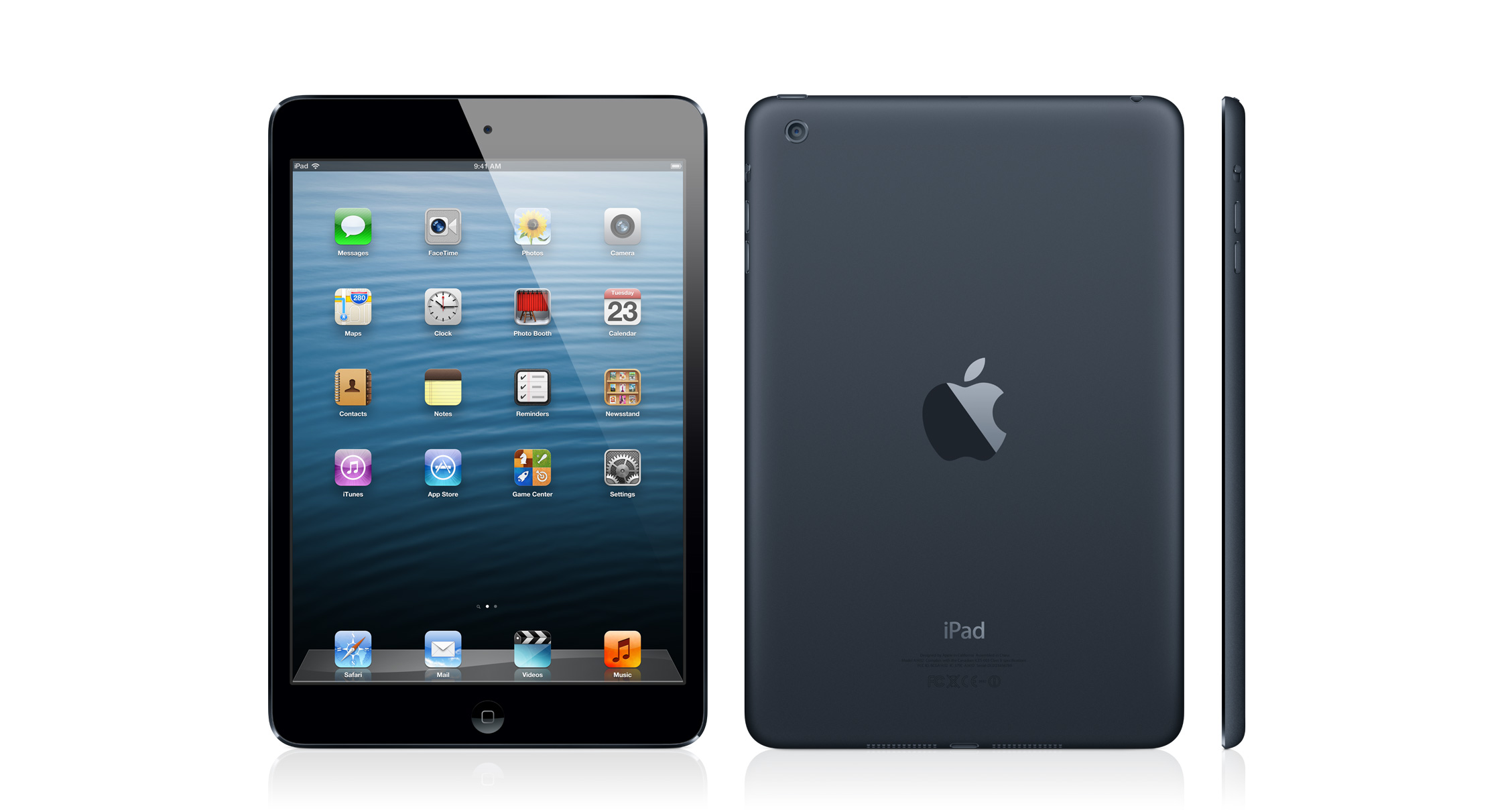
iPad mini -- As you would expect from its name, the iPad mini is somewhat smaller than the other iPads, withdimensions of 7.9 by 5.3 inches (200 by 135 mm). In comparison, the iPad 2 is 9.5 by 7.3 inches (241 by 186 mm). The iPad mini is also slightly thinner (0.28 inch, 7.2 mm) and about half as heavy (0.68 pound, 308 g). Inside its black/slate or white/silver case, the iPad mini features an A5 processor, the same as in the iPad 2, but it boasts several hardware upgrades over that older model, including improved cameras (a front-facing 720p-capable FaceTime camera for video chat, and a rear-facing 5-megapixel iSight camera for photos), a better 4G/LTE cellular radio (and corresponding nano-SIM slot), Bluetooth 4.0, and a Wi-Fi radio that Apple claims can achieve “twice as fast” Wi-Fi speeds (in the real world, assume it could be up to 50-percent faster; also see “How Apple “Doubled” iPad Wi-Fi Throughput,” 24 October 2012).

Perhaps most important, the iPad mini’s 7.9-inch screen has exactly the same number of pixels (1024 by 768) as the iPad 2. That means apps designed for the iPad’s 9.7-inch screen will look exactly the same on the iPad mini, with no need for developers to create special versions, as they have had to do for the iPhone 5’s taller screen. Notably, the iPad mini’s screen is not a Retina display — it has 163 pixels per inch (ppi) compared to the iPad 2’s 132 ppi and the third-generation iPad’s 264 ppi.
With a starting price of $329 for the 16 GB model, the iPad mini has become the cheapest member of the iPad line. Like its larger brethren, the iPad mini comes in 16 GB, 32 GB, and 64 GB capacities, for both Wi-Fi-only ($329, $429, and $529) and cellular ($459, $559, and $659) models. Cellular data options in the United States now include Sprint, as well as Verizon and AT&T. Apple also redesigned the Smart Cover for the mini, and that cover will be available in a few different colors.
Fourth-Generation iPad -- Remember how annoying it was when Apple referred to the third-generation iPad as the “New iPad”? Well, that chicken has come home to roost, since the third-generation iPad is now no longer new. In fact, it isn’t even for sale any more, while the sensibly named iPad 2 remains available.
Replacing the third-generation iPad is the fourth-generation iPad, which looks just like its predecessor, but boasts a new A6X chip that Apple claims will double the performance for CPU and graphics processing, as well as an improved front-facing camera that offers 720p HD video for a clearer video-chat experience. As with the iPad mini, Apple claims that the fourth-generation iPad has “twice as fast” Wi-Fi. Apple’s marketing name for this new iPad is “iPad with Retina display” which will be nearly as confusing as “new iPad” in another generation or two.
Pricing and storage options remain the same as for previous models, with Wi-Fi-only ($499, $599, and $699) and cellular ($629, $729, and $829) models in 16 GB, 32 GB, and 64 GB capacities.
Lightning Continues to Strike -- The Lightning cable, which Apple introduced last month for the iPhone 5, fifth-generation iPod touch, and seventh-generation iPod nano, makes its debut in the iPad world with these new models. In case there was any confusion, Schiller mentioned that all Lightning cables work identically among all these new Apple devices. He also noted that several adapters are now available, so you can connect from Lightning to USB, VGA, and HDMI, and he showed a Lightning-compatible SD card reader.
Making the Decision -- Anyone shopping for a new iPad will now have to choose between the smaller iPad mini and the more-substantial fourth-generation iPad with its Retina display. The first- and third-generation iPads are no longer available from Apple, though the 16 GB model of the iPad 2 continues to hang on at the reduced $399/$529 price point.
The smaller size and lower price tag of the iPad mini will help it compete against the many models of Kindle, Nook, and various Android tablets that are smaller and cheaper than the larger iPad. Apple is certainly aware of this, and they spent a surprising amount of time during the announcement dissecting differences between the iPad mini and the Google Nexus 7 tablet, which is still a good bit cheaper at $199 for 8 GB and $249 for 16 GB.
Only time will tell if the form factor of the iPad mini will prove significantly popular. Its size does make it more portable, certainly, but that small size will also make the device harder to type on for those who haven’t mastered thumb typing. (In Apple’s elegant iPad mini ad, the camera shows someone playing piano in the GarageBand app on a fourth-generation iPad with multiple fingers, then pans to show a single finger playing the same app on an iPad mini.) Also, I wonder if the iPad mini’s smaller pixels will prove difficult to read, though our own Jeff Carlson had some hands-on time with the iPad mini in the press room after Apple’s announcement, and he said that the screen looked “nice” and “not squished at all.” (He wrote up his impressions for the Seattle Times in “iPad mini looks like a good fit.”) Still, if you have trouble reading type in small sizes, I suggest that you examine the iPad mini in person before buying one.
If size is your key feature, it’s also worth considering if the fifth-generation iPod touch might be a better option, since it isn’t a whole lot different from the iPad mini in terms of specs (apart from the smaller physical screen and lack of cellular data support) and costs $299 for 32 GB and $399 for 64 GB.
I don’t expect that many people who own the iPad 2 or third-generation iPad to buy an iPad mini right away, since it doesn’t offer that much extra. (Given our collection of previous iPads, my family is certainly not getting one; nor do we see any reason to get a fourth-generation iPad.) Owners of the original iPad might be more interested, thanks to the faster performance and cameras, as well as the smaller size. Given its pricing, I believe the iPad mini will attract mostly people who really want the smaller form factor, rather than just those who are price-conscious and can get either the even smaller 32 GB fifth-generation iPod touch for $30 less than the 16 GB iPad mini, or the larger 16 GB iPad 2 for only $70 more than an iPad mini. As with the three 13-inch MacBooks, Apple is making consumers think harder than ever before about features versus price.
Apple said the W-Fi-only models of both the iPad mini and the fourth-generation iPad would ship on 2 November 2012 in numerous countries. The cellular models should begin to become available in mid-November, beginning just in the United States and rolling out more slowly to other countries.

Tuesday, January 1, 2013

Apple’s iPad Mini 2 Will Get a Retina Display, Says Report

Apple’s iPad mini has been on the market for what, six days, and already rumors of its sequel are hitting airwaves. Not entirely unusual for the Apple universe, I suppose, but the mini hasn’t even had time to breathe and already something better is being talked about.
According to DoNews, manufacturers are already in the early stages of producing iPad mini Retina displays. One supplier in particular, AU Optronics, which supplies the 7.9-inch panels for the current mini, is working on 2048 x 1536 displays for the next gen model. The boost in resolution would put it on par with the iPad 3 and iPad 4, meaning the mini 2 (or whatever it’ll be called) will run all the apps already optimized for the Retina displays.
In addition to the higher res screen, AU Optronics will reportedly utilize Sharp’s IGZO technology, which will allow Apple to implement an even thinner display while being more power efficient. The upgraded device will allegedly hit mass production during Q2 or next year in time for a fall 2013 release. I wonder what other sort of upgrades we can expect? A6X chip? 8-megapixel camera?